Founder-led onboarding in private beta

Put eBay Managed Payments payouts into Xero without spreadsheet cleanup

SalesToAccounts is a narrow bookkeeping sync for UK eBay sole traders using eBay Managed Payments and Xero. It turns each payout into one Xero entry for that payout so sales, fees, refunds, and adjustments are easier to review and reconcile.

It is deliberately built for UK eBay sole traders using eBay Managed Payments and Xero on a non-VAT, cash-basis, single-entity, GBP-only setup. That narrow scope keeps the workflow simpler, clearer, and more predictable for sellers who just want payout bookkeeping done properly.

The current route is still private beta with manual fit review and founder-led onboarding for accepted accounts. That is there to keep the rollout controlled, not to hide the workflow.

If your setup already looks close, start with the fit checklist. If you want proof first, use the payout walkthrough or setup guide before deciding whether to apply.

When you are ready for the direct beta review route, the beta review page includes the full review form.

What it is, why it exists, and why the scope is narrow

What it is

SalesToAccounts takes each eBay Managed Payments payout and creates one entry in Xero instead of leaving you to piece it together manually.

Why now

Sole traders are under more pressure to keep cleaner digital records as Making Tax Digital moves closer. For eBay sellers, the friction is usually not the filing step first. It is keeping payout bookkeeping in Xero clear enough that later filing does not start from messy spreadsheet reconstruction.

Why the scope is narrow

The narrow scope is deliberate: one marketplace, one ledger, one bookkeeping model, and fewer ambiguous edge cases. The product is intentionally narrow so the workflow can stay practical instead of becoming vague, bloated, or full of edge-case accounting paths.

Where SalesToAccounts fits in the “why now” chain

The current pressure is practical, not theatrical: eBay payouts are messy by default, Xero needs cleaner records going in, and later filing still happens elsewhere.

01

eBay payout data

eBay Managed Payments creates a net payout that hides sales, fees, refunds, and adjustments.

02

SalesToAccounts

SalesToAccounts turns that payout into a bookkeeping entry in Xero before it becomes a year-end problem.

03

Xero records

Xero remains the accounting system holding the journals, references, and reconciliation result.

04

Filing elsewhere

HMRC filing stays outside SalesToAccounts. The role here is cleaner records going into the rest of the stack.

Who this is for and who should stop here

The product is meant to be easy to rule in or rule out. If your setup is outside this scope, it is not the right tool yet.

Good fit

SalesToAccounts is for you if all of this is true

  • UK sole traders selling on eBay and paid through eBay Managed Payments
  • Xero users on a single-entity, GBP-base setup
  • Non-VAT, cash-basis bookkeeping with straightforward payout handling

Not a fit yet

Do not apply if you need broader bookkeeping coverage

  • VAT, accrual-led, stock, inventory, or cost-of-goods workflows
  • Limited companies, multiple entities, multiple Xero organisations, or non-GBP setups
  • Other marketplaces, other ledgers, HMRC filing, or real-time sync expectations

This service does not provide bookkeeping advice or HMRC submissions.

Supported configuration (current)

  • UK sole traders only
  • eBay Managed Payments only, with Xero as the destination ledger
  • Non-VAT only (VAT workflows are not supported)
  • Cash-basis, straightforward bookkeeping only, without stock, inventory, or cost-of-goods handling
  • Single-entity / single Xero organisation only
  • GBP-only (Xero base currency GBP)
  • Scheduled syncs only (not real-time)

If you don't match the above, SalesToAccounts is not suitable yet.

Short version: For: UK eBay sole traders using eBay Managed Payments and Xero on a non-VAT, cash-basis, single-entity, GBP-only setup Not for: Not for VAT, accrual-led, stock, inventory, or cost-of-goods workflows; limited companies; multiple entities or Xero organisations; non-GBP setups; other marketplaces or ledgers; HMRC filing; or real-time sync expectations.

Worked example

See a payout before it is posted

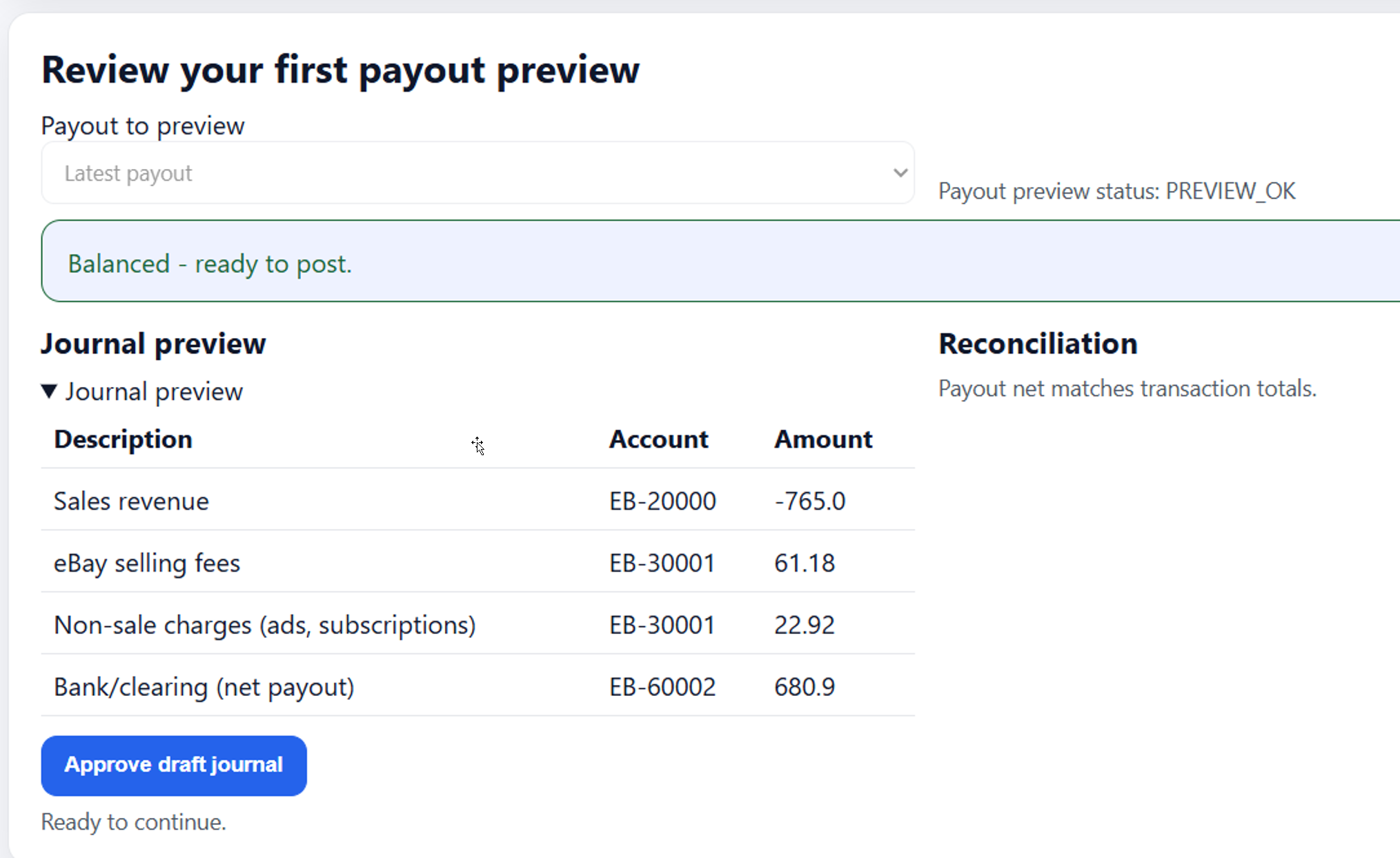
SalesToAccounts previews payout 7348003 before posting, breaks it into component lines, and checks that the journal balances to the GBP 680.90 net payout.

The full walkthrough shows the same payout carried through to Xero with a clear trail, plus what to check on the first payout before you trust scheduled posting.

See the proof walkthrough

Need the reconciliation view as well?

Demo clip

Short demo clip coming soon

A short demo clip is coming soon, but it is not available yet. The real payout walkthrough is the current proof route to use.

Use the real payout walkthrough instead

Get started in 4 steps

If the fit is right, connect both accounts, choose your Xero mappings, confirm one preview payout, then turn on scheduled posting.

01

Connect Xero

Connect the Xero organisation you want the payout entries to go into.

02

Connect eBay

Connect the eBay account that receives your Managed Payments payouts.

03

Choose mappings

Choose where sales, fees, refunds and adjustments go in Xero.

04

Confirm and automate

Review your first payout, then turn on scheduled posting.

Choose the next page that matches your question

Start with proof or setup if you are still assessing the workflow. Use the beta review page once you are ready to check fit or apply for review.

Primary integration guide

Need the broad eBay/Xero guide?

Use the Xero eBay integration guide first for the broad overview, then use the live integration page for the exact current scope and status.

Open the Xero eBay guide

Proof walkthrough

Need proof before deciding?

Use the proof walkthrough to see one payout followed from eBay through to Xero reconciliation.

Open the proof walkthrough

Setup guide

Need the setup steps?

Use the setup guide if you already know the workflow fits and want the onboarding sequence.

Open the setup guide

A2X comparison

Using A2X already?

Use the dedicated A2X alternative page if you want the narrow-fit answer without a generic feature shoot-out.

Open the A2X alternative page

Link My Books comparison

Using Link My Books already?

Use the dedicated Link My Books alternative page if you want the narrow-fit answer without broad comparison claims.

Open the Link My Books alternative page

Accountant route

Need the accountant view?

Use the accountant page if the books will be reviewed by an accountant or bookkeeper before any change is made.

Open the accountant page

Guides and decision pages

Every public article is linked here in rendered HTML so sellers and search engines can move from the homepage straight to the right question.

Commercial guide

Xero eBay integration for UK sellers

Connect eBay Managed Payments to Xero and automate payout-level accounting for sales, fees and refunds.

Decision page

Can you connect eBay to Xero?

Can you connect eBay to Xero? Understand what the bank feed covers, what it misses, and when a payout-level connector becomes necessary.

Guide

How eBay Managed Payments works

A concise explanation of how eBay Managed Payments moves from buyer payment to net payout for UK sellers.

Guide

Why eBay payouts don't match your sales

Why a bank payout from eBay often differs from gross sales, and what that means for practical bookkeeping.

Guide

How to record eBay payouts in Xero

A practical payout-based structure for recording eBay Managed Payments in Xero and reconciling the bank receipt.

Guide

How to reconcile eBay payouts in Xero

Match eBay payout deposits to Xero bank feeds and fix the common reasons a recorded payout will not reconcile.

Guide

eBay fees explained

Understand the main types of eBay seller fees, where they appear in payout records, and how to keep them separate in bookkeeping.

Guide

How refunds affect eBay payouts

See how refunds change eBay payouts, what fee credits may apply, and how to record the accounting effect cleanly.

Guide

Simple bookkeeping workflow for UK eBay sellers

A simple weekly and month-end bookkeeping routine for UK eBay sellers who want consistent records without a complex process.

Decision page

Spreadsheet vs software for eBay bookkeeping

Compare spreadsheets and dedicated software for eBay bookkeeping, including trade-offs in time, control, and reconciliation.

Guide

Making Tax Digital for eBay sellers

What MTD for Income Tax changes for eBay sellers and why payout-grade digital records matter before filing deadlines arrive.

Guide

Cash basis accounting for online sellers

How HMRC cash basis works for many sole traders and why payout-based records often fit online selling workflows.

Private beta

Accepted sellers use it free during beta

The current setup is a narrow rollout with private beta, manual fit review, and founder-led onboarding for accepted sellers who fit the published scope. Standard pricing after beta starts at £15 monthly, with an annual option kept secondary for sellers who already know the workflow fits.

  • Applications are reviewed manually against the supported configuration.
  • Accepted beta users get onboarding help and email support.
  • The narrow scope is what keeps the plan simple rather than turning it into a broad suite.

Next step

Check fit first, then apply for review

Start with the fit checklist if you are still ruling the tool in or out. Move to the full beta review page when you are ready to apply for review. If you are still checking whether the workflow is right, review the proof walkthrough first.

What happens after you start beta review

The current journey is fit check first, manual review second, then guided onboarding for accepted sellers.

01

Check fit

Use the fit checklist to confirm you match the published narrow scope.

02

Submit for review

Submit for beta review. It is checked manually before any onboarding starts.

03

Onboard on one real account

Accepted sellers connect Xero, connect eBay, choose mappings, and review one payout.

04

Billing later

Accepted beta users use the product free. Standard billing matters only after beta closes.

What cautious sellers can check before they apply

SalesToAccounts is small and narrow by design, so the trust surface needs to be practical: proof, published service details, clear support routes, and clear limits.

Operating model

Clear setup, support route, and product limits

  • Payout-level entries, not line-item sales sync.
  • Scheduled sync runs rather than real-time posting.
  • Stable payout references and safe repeat processing.
  • Founder-led onboarding and email support during the current beta.
  • Proof walkthrough, setup guide, and eligibility criteria are public before you apply.

Published references

Public pages that explain how the service operates

If you want to check how the product is run before applying, start with the public references below rather than guessing from marketing copy.

  • Proof walkthrough for a real payout followed into Xero.
  • Security for disclosure and email authenticity details.
  • Status for incident updates and service-state notices.
  • Subprocessors for website and service vendors.
  • Contact for support, security, and general email addresses.

Company and trust

Published company details

SalesToAccounts is operated by SALES TO ACCOUNTS SOFTWARE LTD , based in Edinburgh, UK. Registered in Scotland.

  • Company No.: SC881421
  • Registered office: 3 Hill Street, Edinburgh, Scotland, EH2 3JP
  • VAT status: Not VAT registered
  • Pricing, legal, privacy, security, and status pages are published.

Support expectations

What support looks like right now

Support is handled by email. Beta applications are reviewed manually, accepted users get founder-led onboarding help, and service issues are reflected on the status page and relevant support follow-up emails.

Looking for eBay to Xero integration in the UK?

Start with the Xero eBay integration guide for the broad overview, then use the live integration page for the exact current scope and operating model.

Why does the payout not match sales?

Read the payout mismatch explainer for the bookkeeping context behind the bank receipt.

How should it be recorded in Xero?

Use the Xero recording guide for the payout-level posting structure.

Disconnect and deletion

You can request service disconnection and data deletion at any time.

  • Revoke access in the connected supported platforms first.
  • Email support from your registered account email with your account email and organisation name.
  • We may ask you to verify your identity or authority before actioning changes.
  • We remove service access, purge processing copies, and confirm completion after each step.

Start the process

Email support@salestoaccounts.co.uk if you want to disconnect the service or request deletion.