Proof walkthrough

Proof walkthrough: one eBay payout into Xero

This page uses a real PII-safe payout example.

It follows payout 7348003 with a net payout of GBP 680.90 from eBay Managed Payments through SalesToAccounts into Xero.

It shows the current live scope only: payout-level bookkeeping for UK eBay sole traders using eBay Managed Payments and Xero on a non-VAT, cash-basis, single-entity, GBP-only setup

If that is not your setup, treat this as proof for a different workflow and stop at the fit page: Not for VAT, accrual-led, stock, inventory, or cost-of-goods workflows; limited companies; multiple entities or Xero organisations; non-GBP setups; other marketplaces or ledgers; HMRC filing; or real-time sync expectations.

Want the shorter setup overview? See the setup guide.

Click any proof image to open the full-size version.
Step 1

eBay creates the payout

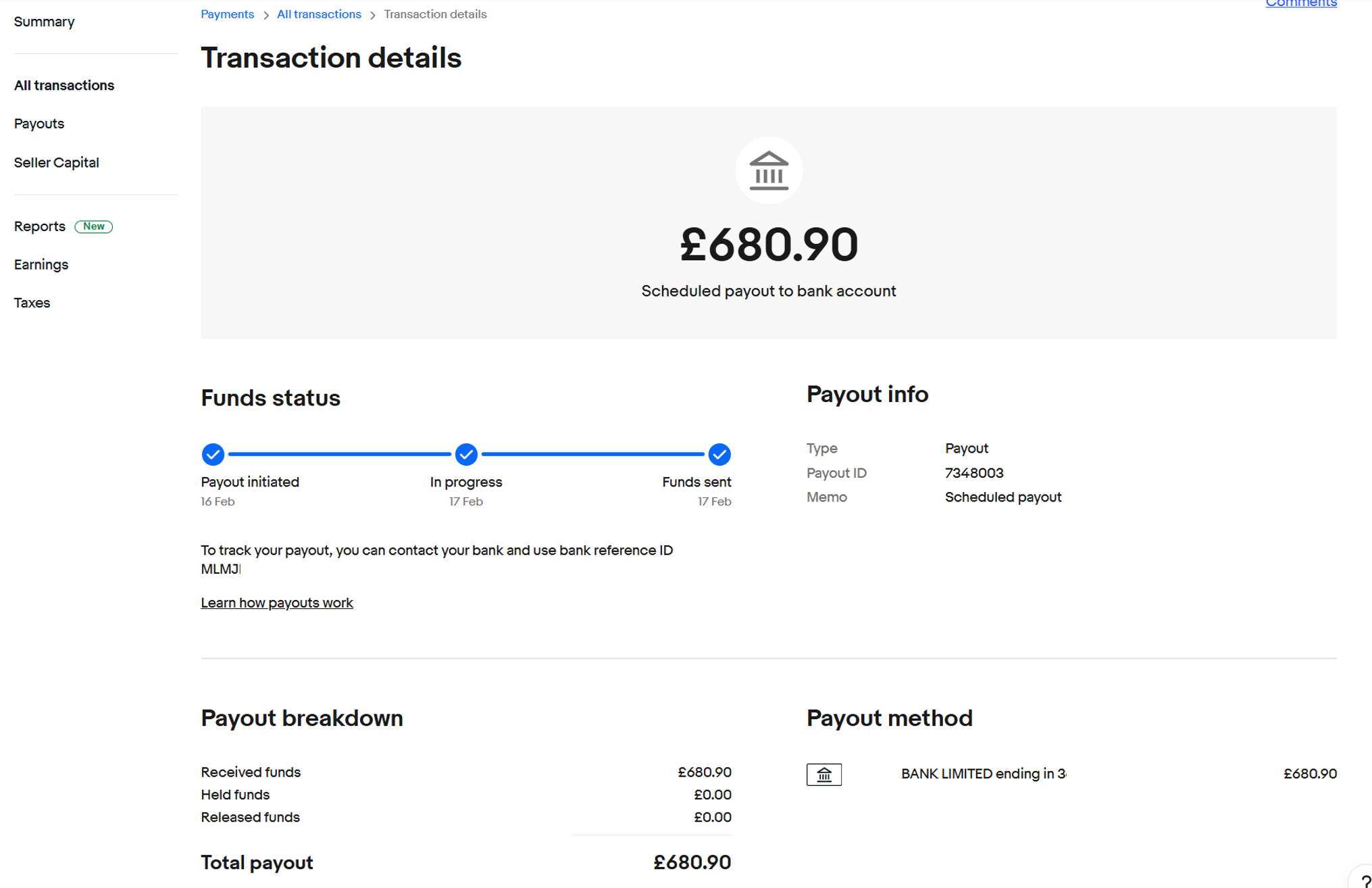
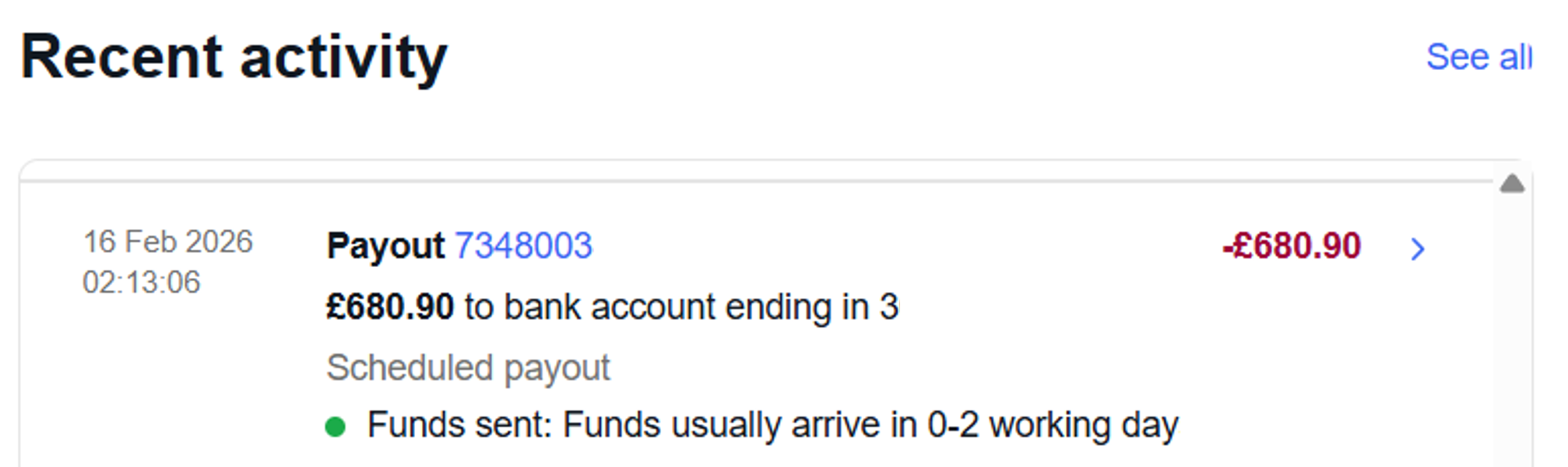
eBay creates payout 7348003 for GBP 680.90. That payout ID and amount are the starting point for downstream matching and review.

This is the source event that SalesToAccounts works from.

eBay recent activity entry showing payout 7348003 for GBP 680.90 to a bank account ending in 3.
eBay recent activity showing payout 7348003
eBay transaction details showing payout ID 7348003 and total payout GBP 680.90.
eBay payout detail for the same GBP 680.90 payout

Step 2

The bank receives the payout

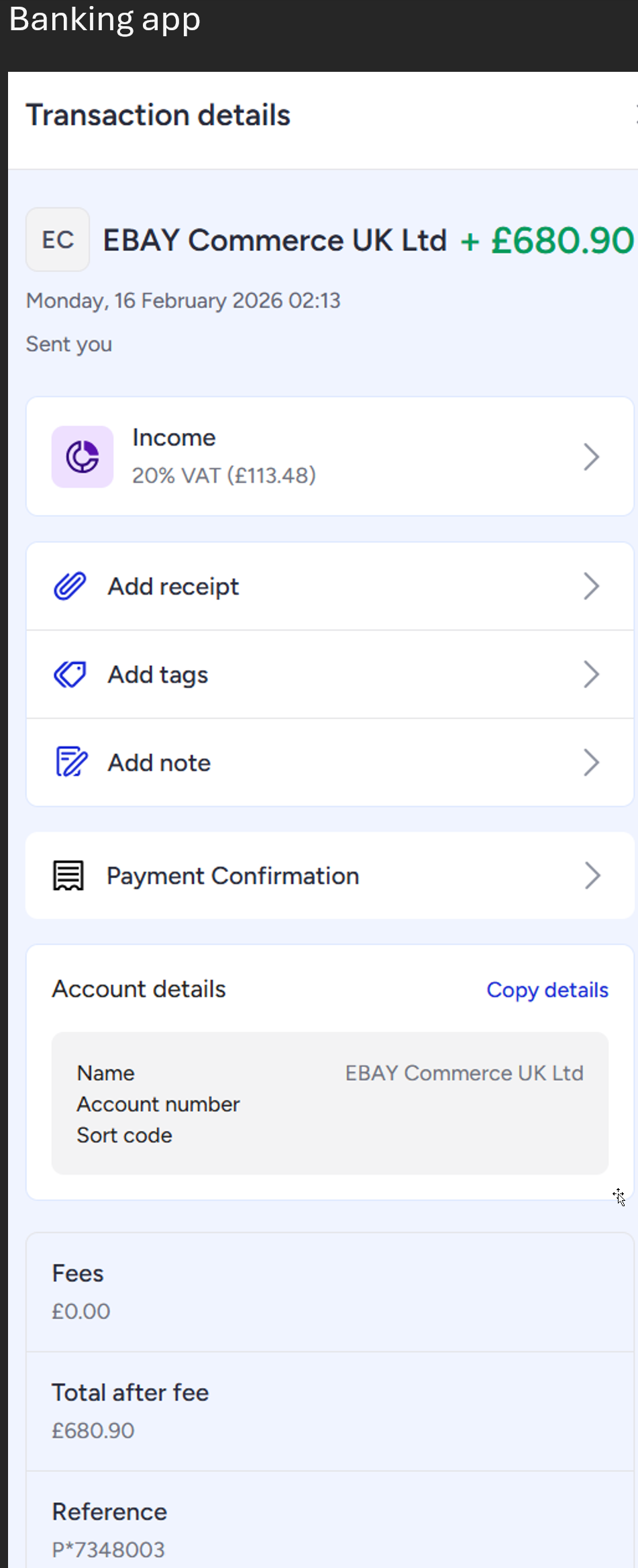
The same payout reaches the bank as a deposit from EBAY Commerce UK Ltd. The amount and the bank reference P*7348003 provide another matching point.

The bank app's own category labelling is incidental here. The proof point is the payee, the receipt amount, and the reference that tie back to the eBay payout.

Bank app transaction details showing EBAY Commerce UK Ltd received for GBP 680.90 with reference P*7348003.
Example bank receipt of the same payout amount and reference

Step 3

SalesToAccounts previews the journal before posting

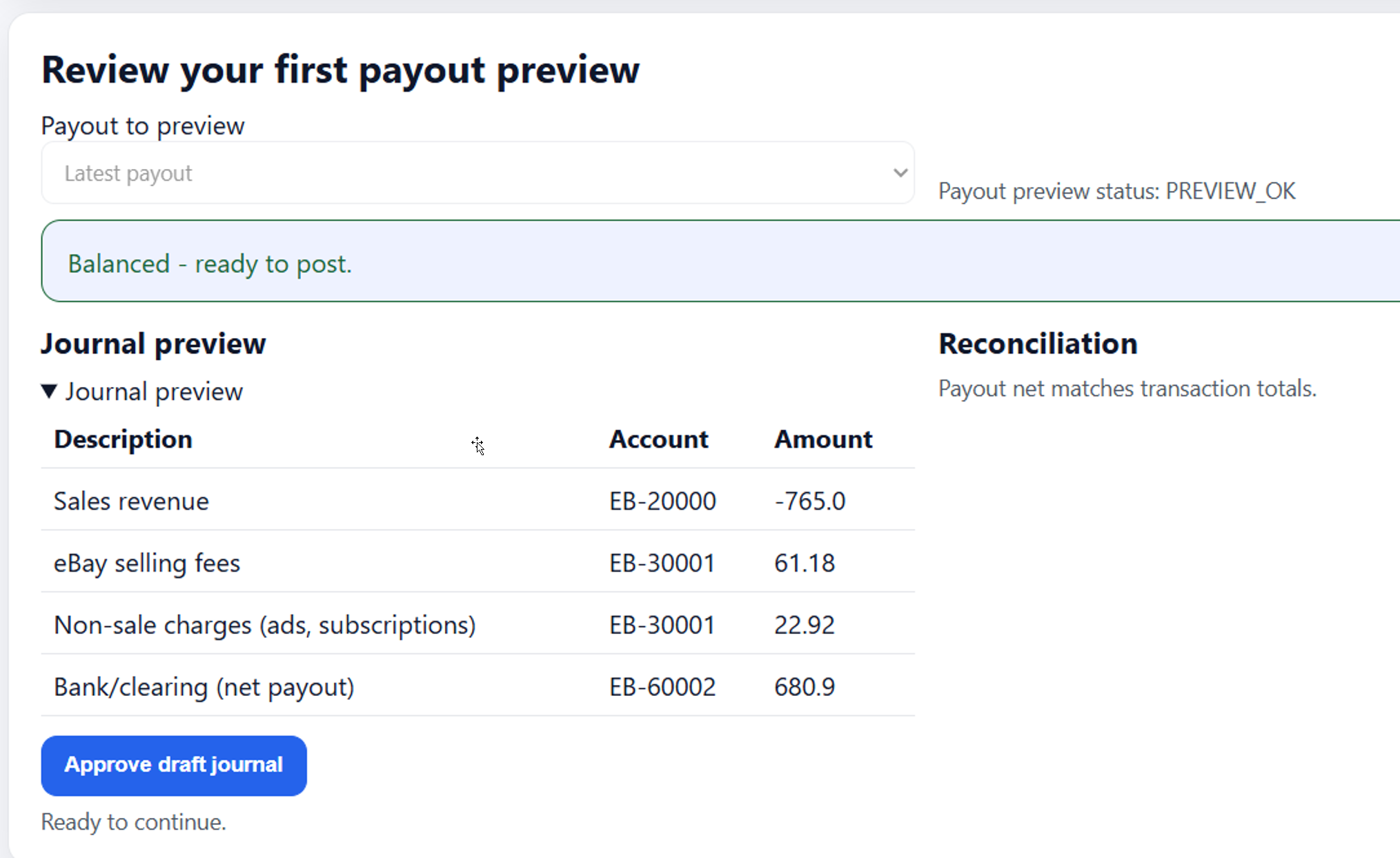
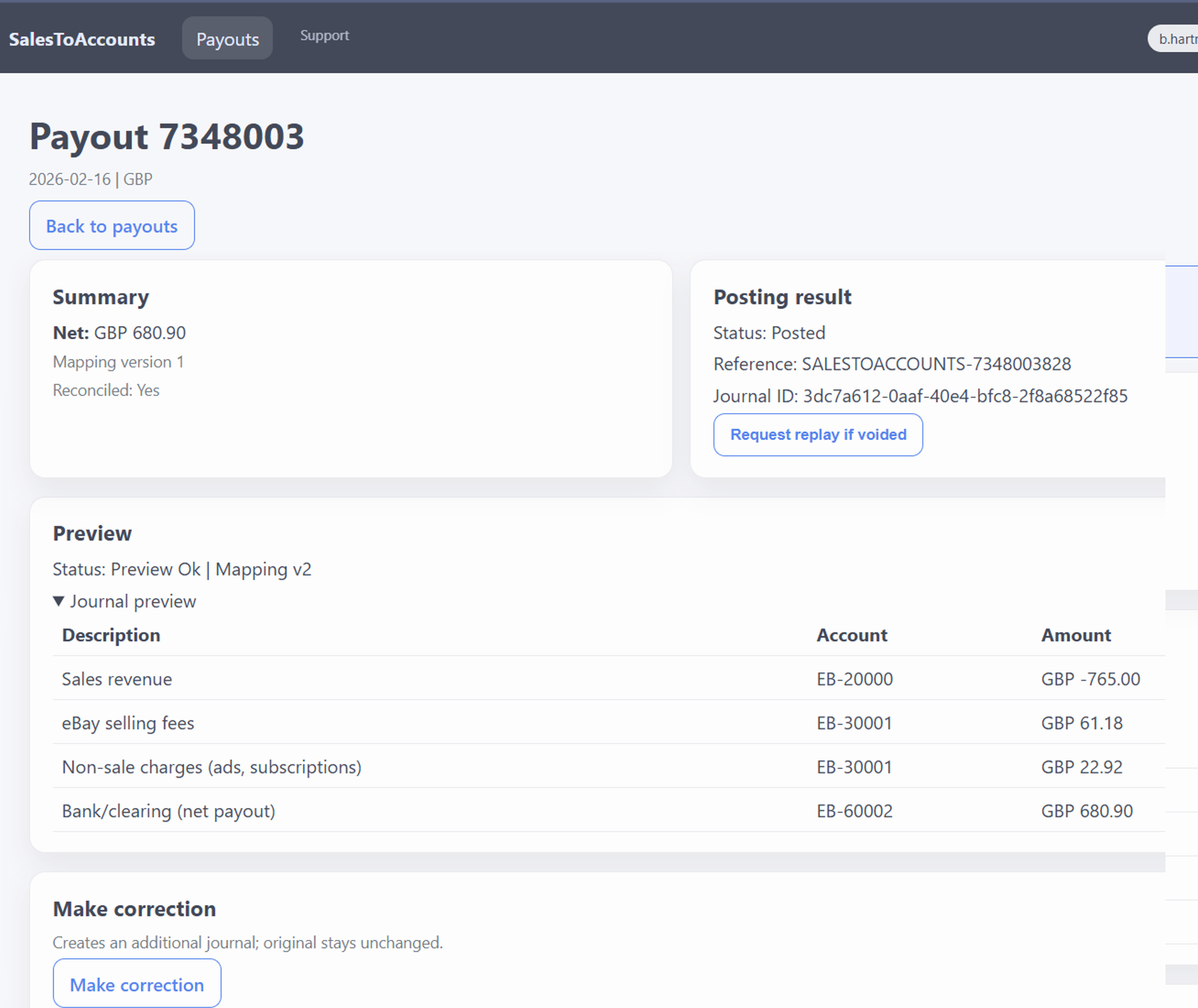
SalesToAccounts previews the payout before posting. The preview breaks the payout into component lines and checks that the net payout matches the underlying transaction totals.

  • Sales revenue
  • eBay selling fees
  • Non-sale charges such as ads or subscriptions
  • Bank/clearing for the net payout

Only then is the payout ready to post.

What to check on your first payout review

The first review is where confidence is earned. You are not trying to prove every possible edge case. You are checking that one real payout produces a bookkeeping result you can understand before scheduled posting is turned on.

01

Reference and amount

Check that the payout ID and net payout amount match what eBay shows and what later lands in the bank.

02

Component split

Check that sales, fees, refunds, and other adjustments are separated into understandable lines rather than collapsed into one bank figure.

03

Mappings and Xero accounts

Check that each line is going to the Xero account you actually expect for your bookkeeping setup.

04

Balanced result

Check that the journal balances to the net payout and still makes sense before scheduled posting is enabled.

Step 4

SalesToAccounts records an auditable run

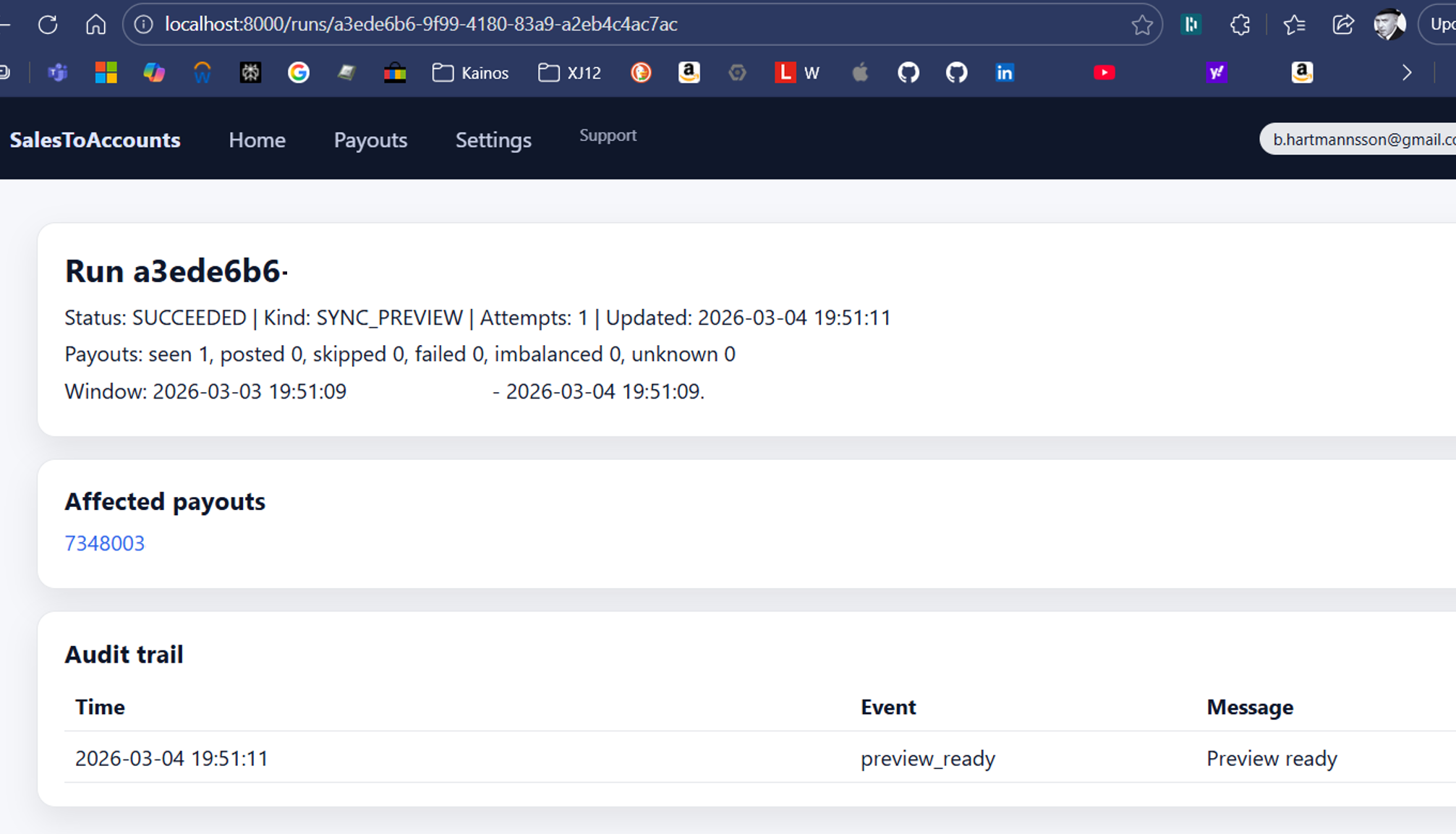
Every preview or sync run leaves a record. The run page shows what kind of run it was, which payouts were affected, and which events were recorded.

In this example, payout 7348003 is listed in the affected payouts section and the audit trail records a preview_ready event.

SalesToAccounts run record showing payout 7348003 in affected payouts and a preview_ready audit event.
Preview run with affected payout and audit event

Step 5

SalesToAccounts keeps the payout-level result reviewable

Each payout stays easy to check after preview or posting. The payout page keeps the net amount, posting result, posting reference, journal ID, and journal preview together.

Correction and replay actions are available when they are needed. They are there as safety tools, not the main selling point.

SalesToAccounts payout detail for 7348003 showing posted status, posting reference, journal ID, journal preview, and correction controls.
Payout-level detail remains reviewable after posting

Step 6

Xero receives the balanced journal

SalesToAccounts posts a balanced journal into Xero for payout 7348003. The payout grouping stays visible in the journal lines.

The journal includes the expected sales, fee, and balance-adjustment entries, and the totals balance.

Step 7

The Xero bank line is reconciled

The imported bank line for EBAY Commerce UK Ltd with reference P*7348003 appears in Xero and is reconciled against the accounting result.

The final position is traceable from the eBay payout to the bank receipt and through to the Xero reconciliation result.

Xero reconciled transaction details showing the GBP 680.90 EBAY Commerce UK Ltd bank line matched to the payout payment.
Xero bank line marked reconciled

What this proof gives confidence about

This walkthrough is one real example, but the bookkeeping confidence comes from what is being checked, not just from one set of screenshots.

Scenario 1

Straightforward payout

A normal payout with sales, selling fees, and the final bank-clearing line should be easy to read from preview through to reconciliation.

Scenario 2

Payout with refunds or adjustments

The same payout-level model still needs to keep refunds and other balance adjustments visible instead of hiding them inside the net payout number.

What the proof is showing

Bookkeeping review, not blind automation

The point of the first review is to confirm that one real payout produces a result you understand before you rely on scheduled posting for future payouts.

Summary

One payout, traced end to end

In this example, eBay creates payout 7348003, the bank receives the GBP 680.90 deposit, SalesToAccounts previews and records the posting run, Xero holds the balanced journal, and the bank line is reconciled against the same payout reference.

Want the shorter setup overview? See the setup guide.

Already using A2X? Use the A2X alternative page. Already using Link My Books? Use the Link My Books alternative page.

For accountant or bookkeeper review, use the accountant fit page.

What “looks right” before you rely on it

  • The payout reference stays visible from eBay to the preview, posting record, Xero journal, and bank reconciliation.
  • The net payout is explainable by the component lines rather than treated as a mystery bank receipt.
  • The journal looks balanced and the mapping destinations make bookkeeping sense for your setup.
  • You can follow the path from payout to Xero without needing a spreadsheet reconstruction step.

If you want the reconciliation-focused view of the same bookkeeping logic, use the reconciliation proof page.

Background

Need the background behind this proof?

This page shows the result. If you want the mechanics and bookkeeping logic behind it, use the owner guides below.

Next page

Where to go after the proof page

If the example looks right, the next step depends on why you came here in the first place.